Commit + Attitude | Your AI's commit attitude
Used by Indie Hackers, AI Builders, Vibe Coders

Commitude helps you
trust AI development

Claude just worked for 30 minutes.

Commitude tells you if it's safe, in 5 seconds.

Observe
Timeline · Claude Code & Codex hooks · Dashboard
Understand
Architecture · Schema diagrams · AI descriptions & summaries
Trust
Project health · Confidence · Risk level
commitude / main / dashboard
Connect GitHub in 30 seconds
No code changes required
Free to start
Private repos analyzed for free
Read-only access
AI features are OFF by default
Private repositories require explicit permission

See Commitude in 30 seconds

Watch how Commitude catches a risky AI-generated commit before it ships.

AI has been coding for 30 minutes...

"What is it doing right now?" "Did it stall?" "Is it actually going well?"

Commitude shows you exactly what AI is doing
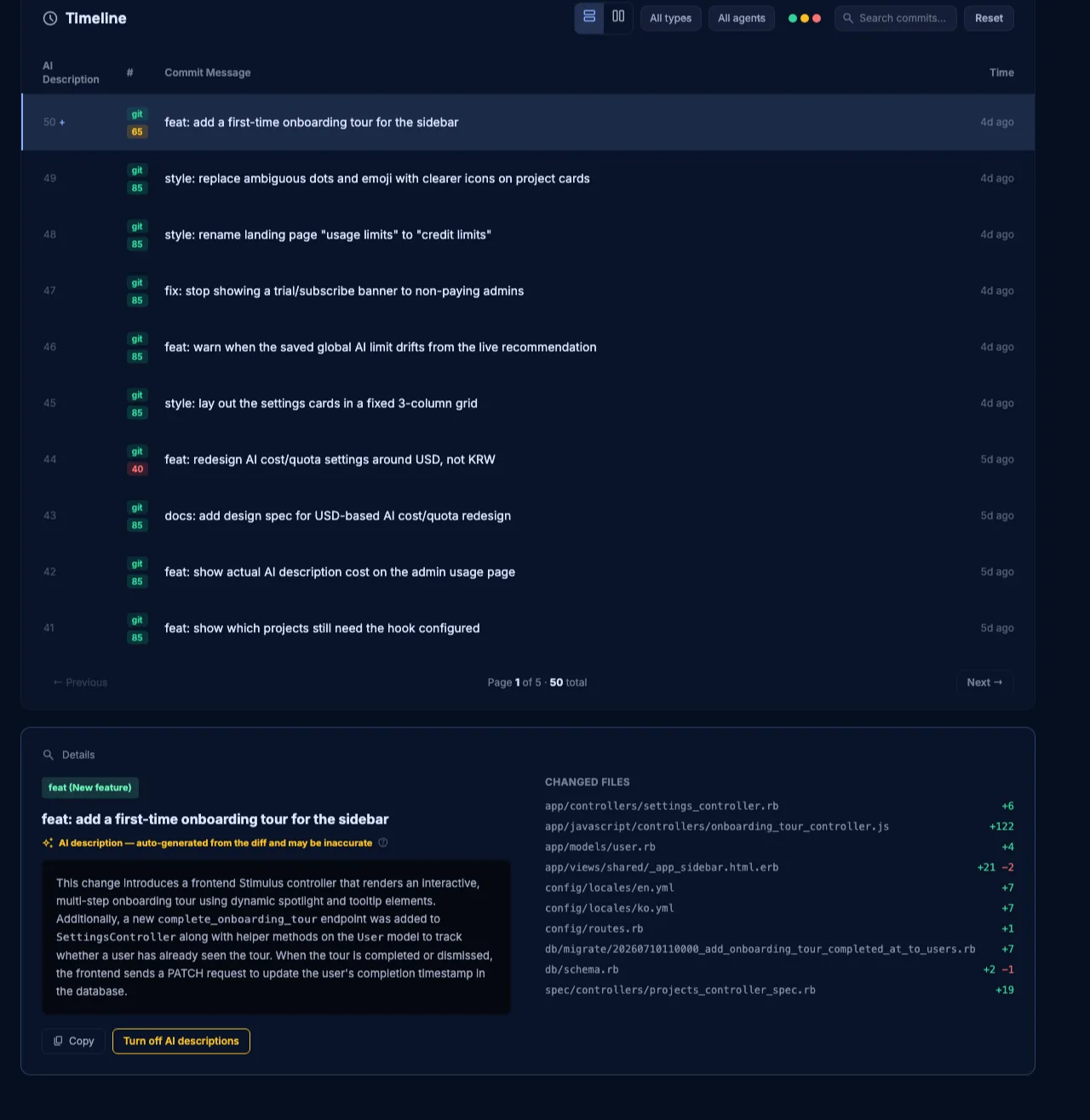
Commitude timeline showing what AI is doing in real time
Core Capabilities

Features that help you trust your AI

See transparently what your AI did, so you can judge the current state with confidence.

verified

Confidence Score

Every commit is scored out of 100, with a risk level and the reasons behind it — not just a number, but the evidence for why it's safe (or isn't) to keep going.

Confidence Score

Everything below is evidence that backs up this score.

fact_check

GitHub Issue Progress

Automatically analyzes the open/closed ratio of GitHub issues to visualize project progress as a live percentage. Projects using a PLAN.md checklist take priority.

Auth Integration 82%
timeline

Real-time Timeline

Combines Git commits with Claude Code and Codex hook events into a single timeline. See which AI work led to which commit.

smart_toy Claude closed GitHub Issue #42...
commit feat: add oauth2 flow provider...
sync

GitHub Sync

No complicated setup needed. Connect your GitHub account once and it automatically collects and analyzes commit history across all your repositories.

terminal
analytics
smart_toy

AI Commit Descriptions

AI analyzes your commit diffs and summarizes what actually changed in 2-3 sentences. Always opt-in, and you're shown exactly what gets sent externally before it happens.

auto_awesome AI Description

"Refactored the login session expiration logic and fixed it to automatically log out on expiration."

hub

Architecture Graph

Visualizes the real architecture of your detected tech stack as a graph. Click a node to jump straight to the actual source file in your project.

Client · Server · Infra
bar_chart

Analytics

See commit type distribution (features · fixes · refactors) and commit patterns by day/time at a glance.

Features
Fixes
Refactors
schema

Schema

Automatically analyzes and visualizes your project's database table structure. Supports major schema formats like db/schema.rb, Prisma, and Drizzle.

users
projects
events
leaderboard

Hotspots

Analyzes recent commit history to rank the most frequently changed files. Spot refactoring hotspots at a glance.

1 app/models/project.rb 32 changes
2 app/controllers/dashboard_controller.rb 21 changes
3 app/javascript/controllers/dashboard_controller.js 18 changes
emoji_events

Achievements

Automatically awards bronze/silver/gold badges based on activity metrics like commit count and work streaks. Turn steady work habits into a game.

military_tech military_tech military_tech

3 steps to start trusting your AI

1

Connect your account

Sign in with GitHub and register the repositories you want to watch.

2

Set up hooks

Configure Claude Code/Codex local hooks; events are sent automatically.

3

Check your dashboard

Enjoy the real-time timeline, stack analysis, and schema diagram.

Seamless Integration

We record
every stepbefore the commit

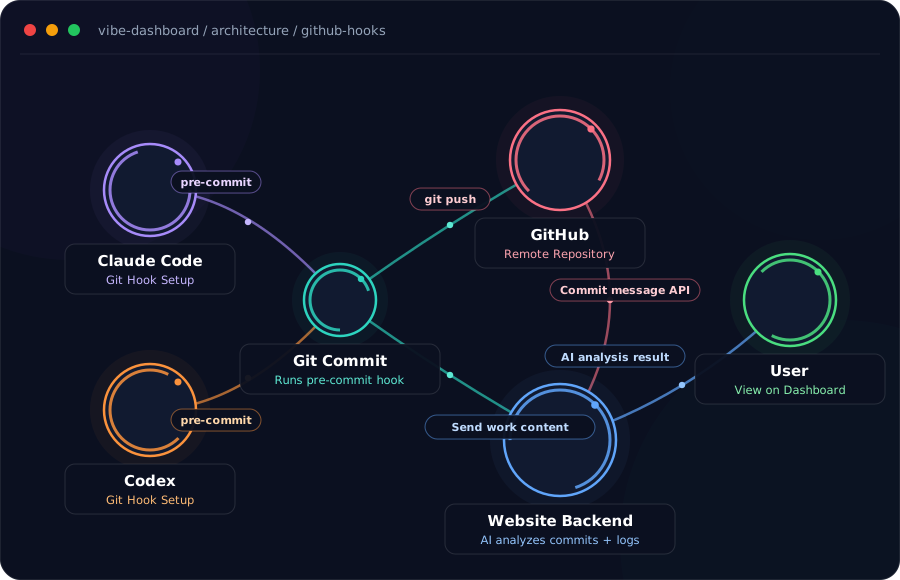
Most dashboards only show you the result (the commit). Commitude uses Claude Code and Codex hooks to visualize every step AI took while thinking and editing — starting before the commit even happens.
verified
Automatic Activity Logging
Detects command executions and file changes instantly and streams them live.
verified
State Snapshots
Tracks how your code architecture changes with each unit of work.
Flow graph showing Claude Code and Codex hooks connecting through GitHub commits to the dashboard
FEAT Refactor login session expiration logic
Example
auto_awesome AI Commit Description

Fixed an issue where users were logged out abruptly with no warning when their session token expired. Now it automatically tries to refresh 5 minutes before expiration, and only redirects to login smoothly if that fails. You don't need to read code to instantly understand how this commit changes the user experience.

AI commit descriptions are generated by combining GitHub commit messages with Claude Code/Codex Git hook session logs
New · Commits anyone can understand

Even complex commits,
explained simply by AI

AI analyzes your commit diffs and automatically generates a plain-language explanation. Even without dev knowledge, instantly understand what changed today and why — and you're always shown when part of a diff would be sent externally, only ever for users who explicitly opted in.

verified_user
Opt-in by default
Always off by default. Diffs are only sent once you turn it on yourself.
speed
Transparent credit limits
Your daily usage limit is always shown up front, and re-viewing an already-generated description doesn't count against it.
Time to brag

Share your AI summary
on social media

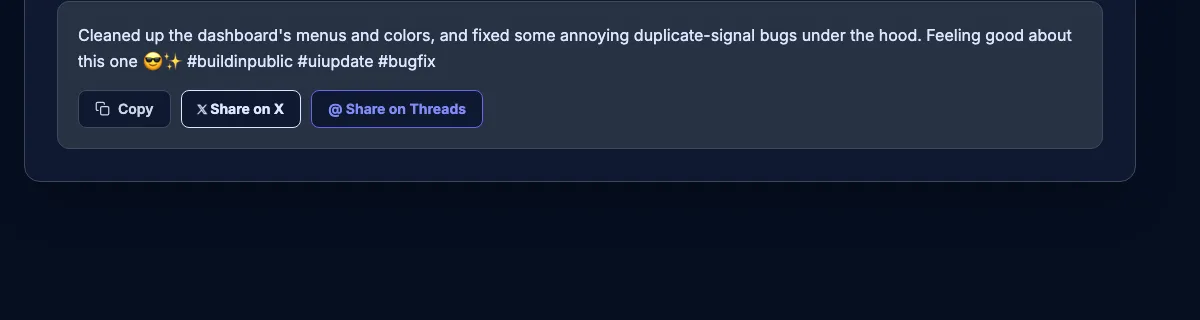
Commitude turns what the AI just did into a short, witty caption for social media. Copy it, or share it straight to X or Threads with one click.
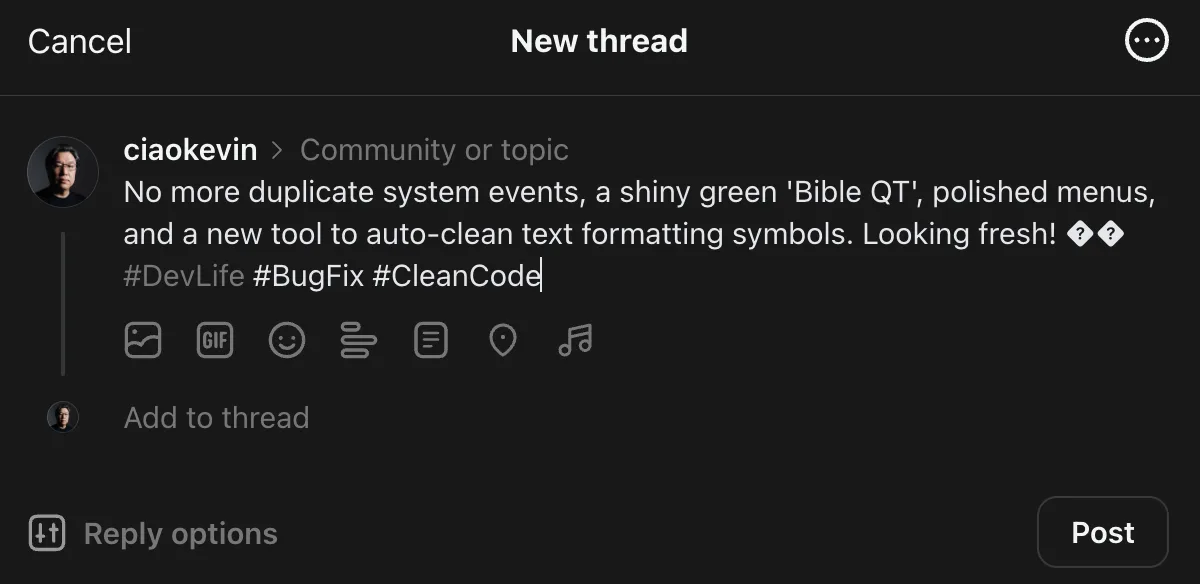
auto_awesome
Rewritten to be fun
Turns a dry technical summary into a one-liner worth posting — using the same AI credit limit you already have, at no extra cost.
ios_share
One-click sharing
Copy the caption, or hit the X or Threads button to open a pre-filled post ready to publish.
Turning an AI summary into a social caption and sharing it to X and Threads
Composing a new Threads post with a Commitude AI summary caption
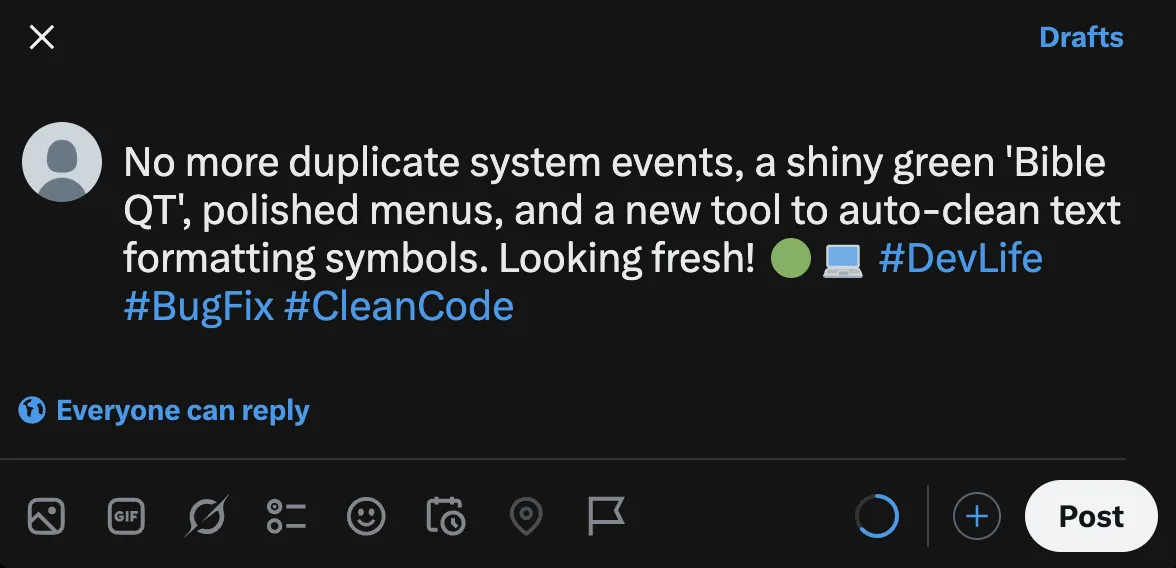
Composing a new X post with a Commitude AI summary caption

A powerful visualization engine

Understand your architecture in the most beautiful way possible.
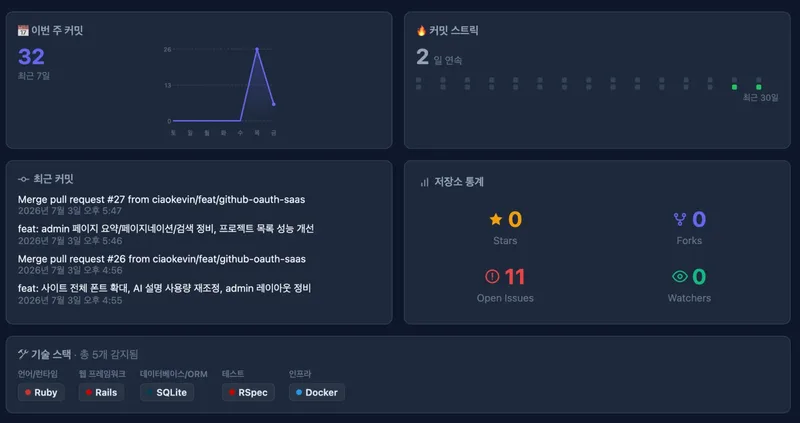
Project Summary
OVERVIEW

Project Summary

This week's commits · streaks · repo stats at a glance
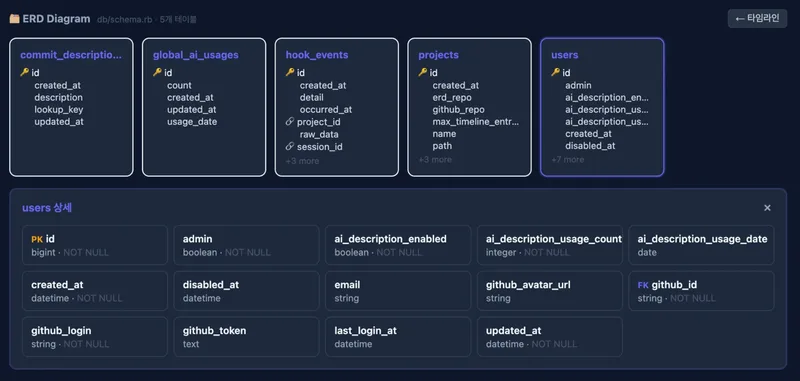
Schema
DATABASE

Schema

Automatic schema visualization from GitHub
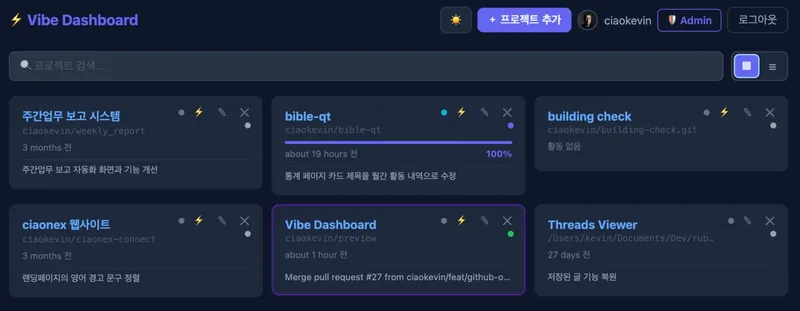
Project Dashboard
MULTI-PROJECT

Project Dashboard

Manage multiple projects as cards on one screen
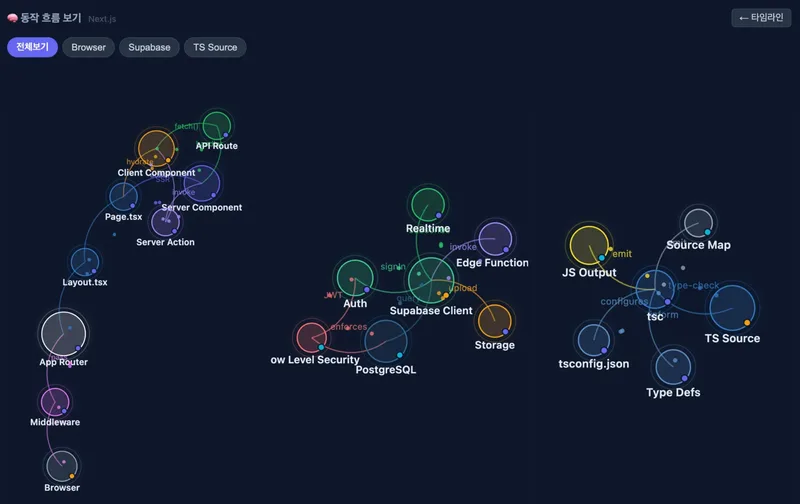
Architecture Graph
SYSTEM DESIGN

Architecture Graph

Architecture flow visualized and linked to real code
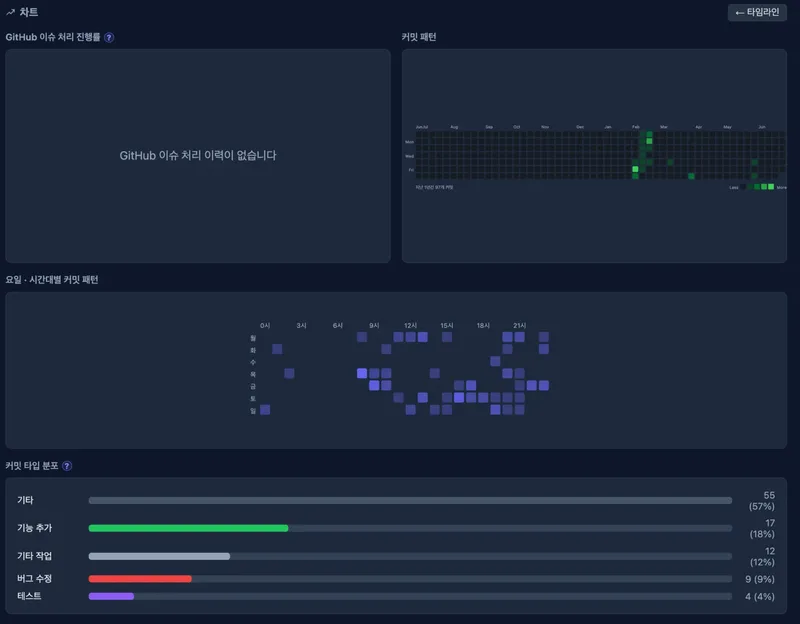
Analytics
ANALYTICS

Analytics

Commit type distribution · day-of-week punch card
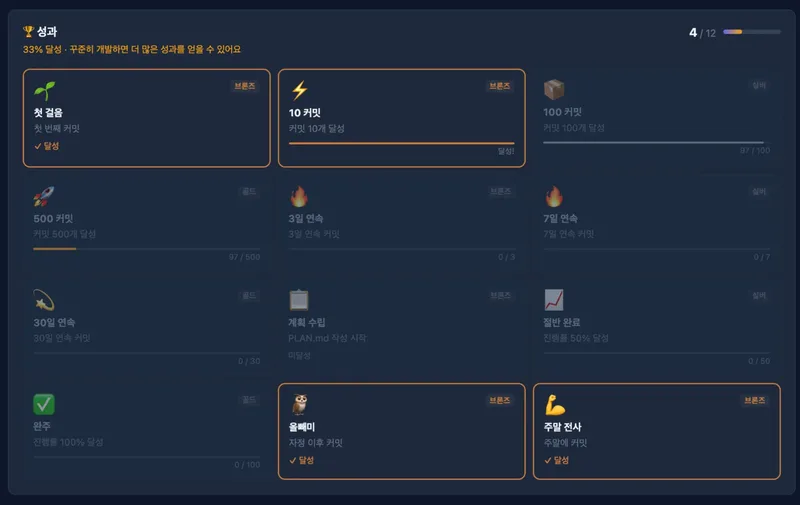
Achievements
GAMIFICATION

Achievements

Track commit streaks and milestones with badges
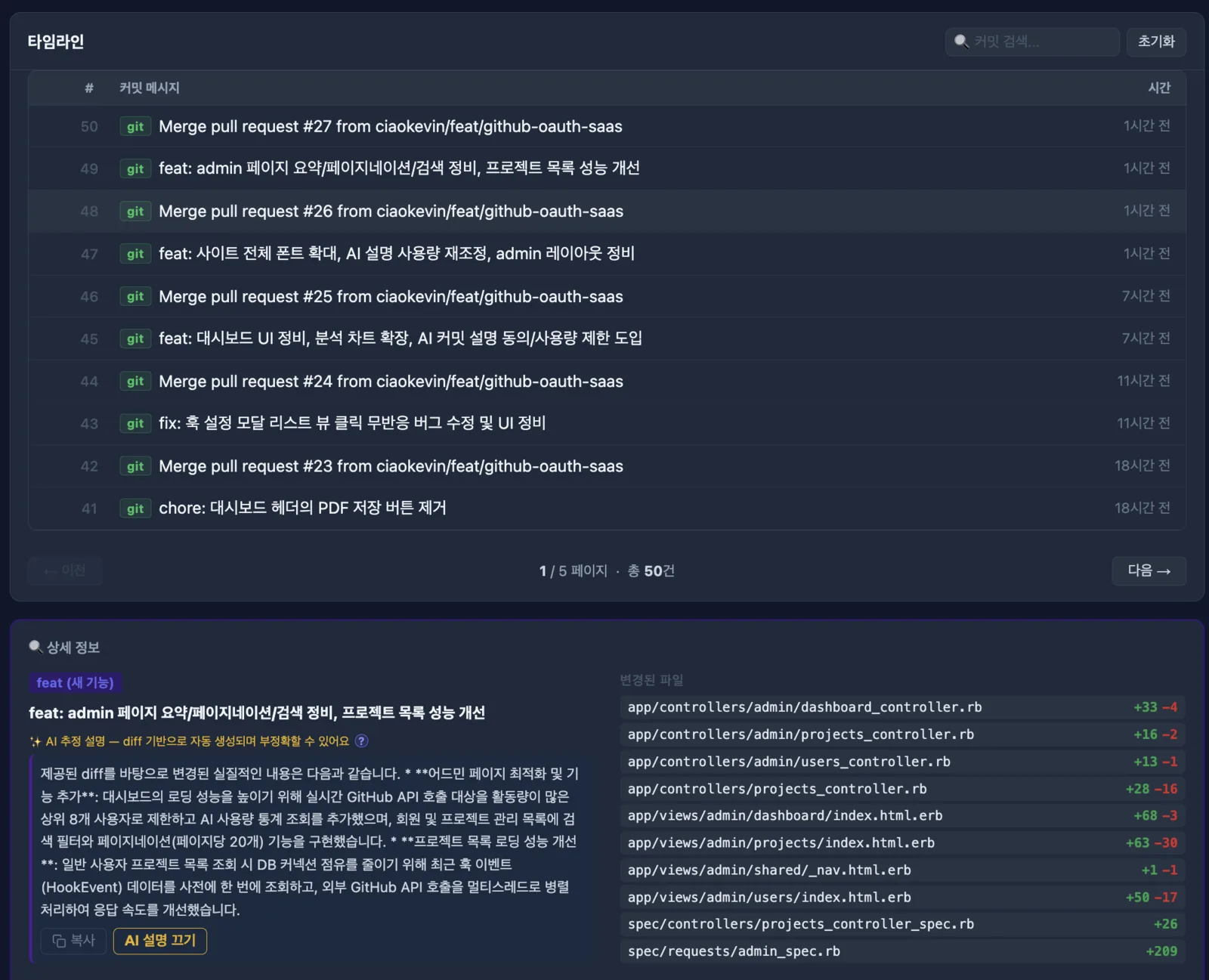
Commit Timeline
TIMELINE

Commit Timeline

Detailed view with AI descriptions and changed files
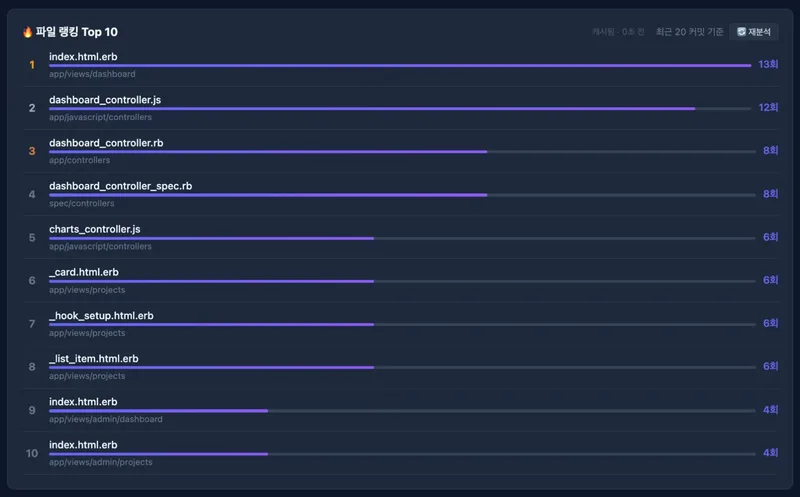
Top 10 Hotspots
HOTSPOTS

Top 10 Hotspots

Real-time analysis of the most frequently changed files

Automatically detects 37+ tech stacks

TypeScript
Ruby
Python
Go
Rust
Java
Next.js
Nuxt
React
Vue
Svelte
Rails
Sinatra
Express
Fastify
Hono
Prisma
Drizzle
PostgreSQL
MySQL
SQLite
MongoDB
Redis
Supabase
Tailwind CSS
shadcn/ui
Bootstrap
NextAuth
Devise
Clerk
Jest
Vitest
Playwright
Cypress
RSpec
Docker
Vercel

Frequently Asked Questions

Find answers to common questions.

How is the Confidence Score calculated, and how much can I trust it? expand_more
It's not an AI subjectively judging your code quality — it's rule-based. Every commit starts at 100 points and loses points whenever a defined risk signal shows up: exposed sensitive info, database schema changes, a large change scope, large deletions, the same file reworked repeatedly, dependency or deploy config changes, or a missing work log. We never show just the number — the signals behind the score are always shown alongside it, so treat the score as a helpful signal and make your final call based on the evidence, not the number alone.
Does Commitude fetch or store my source code? I'm worried about it leaking externally. expand_more
You don't need to worry. Commitude only temporarily looks up the minimum information needed to render the dashboard, and never permanently stores your source code on our servers. Using your GitHub permissions at login, it only looks up commit info, changed files (diffs), and — for the Schema feature — the schema files needed to build it (db/schema.rb, Prisma Schema, etc.). Whatever it looks up is kept only briefly, for 5 to 60 minutes, as a display cache, and is then automatically deleted. The default login grants the minimum access level, which can only reach public repositories. To connect a private repository, Commitude can only access it once you explicitly approve that additional permission yourself. The one exception is the AI Commit Description feature. It's disabled by default (opt-in), and only once you turn it on yourself does it send the commit message and part of the changed code (up to 6,000 characters) to Google's Gemini API to generate the AI description. Commitude never uses your source code to train AI models. See our Privacy Policy for full details.
How long is the free trial? expand_more
You get full access to every feature free for 7 days from signup. After the trial ends, you're automatically billed for your chosen plan, and you can change plans anytime during the trial.
What's the difference between the monthly and annual plans? expand_more
The features are identical — only the billing cycle differs. Choosing the annual plan saves you about 20% compared to monthly.
If I cancel my subscription, does access stop immediately? expand_more
No. You keep access until the end of your already-paid billing period; only future automatic billing stops. Refunds are not provided.
Can I manage multiple projects at the same time? expand_more
Yes — you can register multiple GitHub repositories as projects under one account and view each one's dashboard independently.
Do you support Codex in addition to Claude Code? expand_more
Yes. You can view hook events and commit history from both Claude Code and Codex on the same dashboard in real time.
What does the Schema feature do? expand_more
It automatically analyzes your project's database table structure and visualizes it as a diagram. If your GitHub repo has schema files like db/schema.rb, Prisma, Supabase, or Drizzle, click "Sync with GitHub" on the dashboard to view it.
Does it automatically show what was done and how much AI it cost for every commit? expand_more
Yes. Once you set up the Claude Code and Codex hooks on your machine, the timeline automatically shows the actual commit message content and the estimated AI cost for that work every time a task finishes. Without the hooks, only GitHub commit history is shown — you won't see the pre-commit work or its cost.
What does Architecture show? expand_more
It visualizes how your detected tech stack (frontend, backend, database, infrastructure, etc.) is connected and works together, as a graph. You can filter by layer and follow animated data flow along the connections.
What does Hotspots show? expand_more
It analyzes your recent git commit history and ranks the top 10 most frequently changed files. It helps you spot which files are being modified repeatedly, making it easier to find places that may need refactoring.
How is GitHub issue progress calculated? expand_more
Based on when GitHub Issues were opened and closed, it charts how the ratio of closed to total issues has changed over time. It's an alternative to PLAN.md checklists for projects that track progress with GitHub Issues, and it only appears once a project has at least one issue.
Where can I manage my subscription? expand_more
From the "Manage Subscription" menu in the sidebar, you can update your payment method, check your plan, or cancel — all directly. If you cancel, you can keep using it until the end of your already-paid period.
I'm on GitHub's free plan — can Commitude still analyze my private repos? expand_more
Yes. GitHub's Free plan only provides Insights (commit graphs, Contributors, Traffic, etc.) for private repositories on GitHub Pro or higher. Commitude shows commit history, hotspots, schemas, and architecture graphs for private repos regardless of your GitHub plan.
How do I delete my account, and what happens when I do? expand_more
Click your profile (avatar/username) at the bottom of the sidebar, then choose "Delete account" from the menu that appears. Doing so immediately and permanently deletes your GitHub connection (access token, email, profile), registered projects, and hook event history — this cannot be undone. If you have an active subscription, it will be canceled immediately as well. You can sign up again with the same GitHub account, but you won't receive another free trial.

Simple, transparent pricing

One plan, every feature — no tiers to choose between.

All-in-one

Commitude

$10/mo

VAT excluded

  • check_circle Confidence Score — real-time risk judgment on every commit
  • check_circle Unlimited projects and timeline events
  • check_circle Automatic schema diagram generation
  • check_circle Architecture graph (linked to real code)
  • check_circle AI commit descriptions (opt-in, with daily usage limit shown)
  • check_circle AI-generated commit message summaries
  • check_circle Per-session AI summaries (for sharing on X and Threads)
  • check_circle Analytics (commit type distribution · punch card heatmap)
  • check_circle GitHub issue-based progress history
  • check_circle Achievements · commit streak milestone tracking
  • check_circle Hotspots · automatic detection of 37+ tech stacks
  • check_circle Claude Code and Codex hook integration
  • check_circle AI cost shown in Claude Code/Codex hook-integrated work messages
  • check_circle Warns when security-sensitive files are changed

You'll be billed for your chosen plan after the 7-day free trial. You can change plans anytime during the trial.

No refunds · remaining period usable

Get started for free, right now

No credit card required.
With just a GitHub account, create your dashboard in 30 seconds.

Trusted by
shield_with_heart verified encrypted